Features

Everything in one place — none of it a black box.

A complete tour of what Zone Forge does, from soil sample upload through prescription generation to platform upload. Each feature exists to remove a step you'd otherwise do in a spreadsheet.

Soil Health report card

Your soil test, graded in your own state's language.

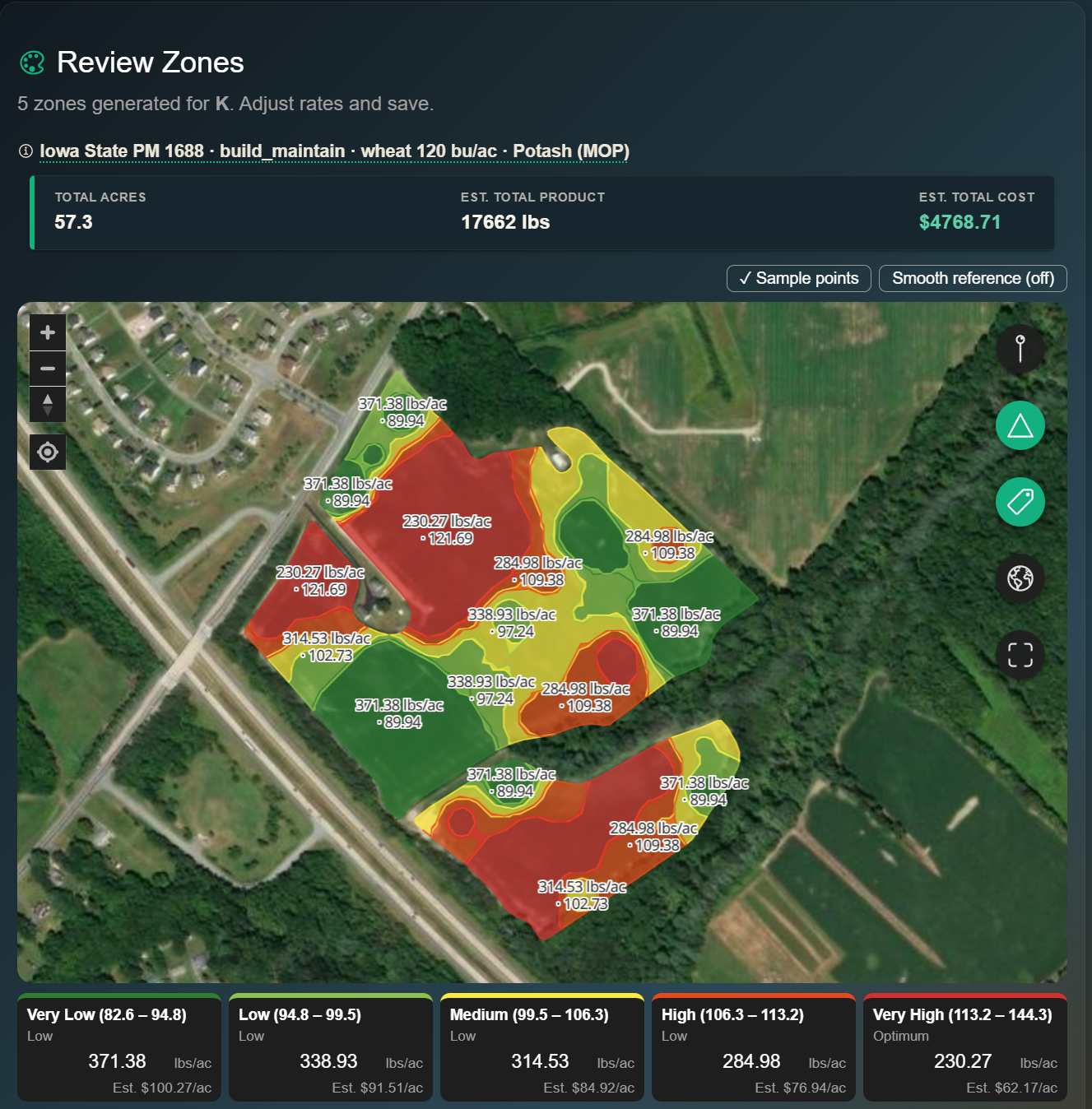
Upload a soil sample and Zone Forge reads it the way your land-grant university does — and tells you, in three seconds on your phone, the one thing to fix first. No spreadsheet, no guessing which number matters.

Your university's own words

Arkansas reads "Very Low → Above Optimum," Delaware reads its Fertility Index, Oklahoma reads "Low / Sufficient" — each state's own published rating, not a generic scale we made up. 26 states grade today; the rest show your measured values with an honest note on why we don't grade that lab format yet.

Precision agriculture you can verify

Every grade traces to that university's published table and the specific lab method it was calibrated for. Send a Mehlich-3 sample to a Mehlich-1 state, or a coastal-plain number to a piedmont table, and the card refuses to grade it rather than hand you a confident wrong answer. We publish our own audit trail.

It knows where your field is

Georgia splits at the Fall Line, Oregon and Washington at the Cascades, Alabama by your soil's holding capacity — Zone Forge picks the right table from your field's location and your CEC, and says which one it used so you can check it.

Below the headline: a worst-first list of every nutrient (color- and word-coded, never color alone), an amber "building toward optimum" band, "more than enough — you can ease off" for what's already high, variable-rate hints where a field is patchy, and a fertility trend across your past uploads. pH and lime are calibrated for all 50 states.

Recommendation engine

A calibrated land-grant source for every state. Three philosophies. Your choice.

Zone Forge ships 40+ published recommendation tables spanning all 50 states — each calibrated to your state's land-grant extension and soil-test method. Pick your state and we auto-resolve the right source. Never a national average.

A few from the 50-state library:

Iowa State PM 1688

Western and Central Corn Belt. Calibrated to Bray-P1 phosphorus and ammonium-acetate potassium. Strong defaults for corn and soybeans.

Tri-State 2020

Ohio, Indiana, and Michigan. Supports both Mehlich-3 and Bray-P1. Updated 2020 calibrations with refined buildup-and-maintain ranges.

Penn State Agronomy Guide

Mid-Atlantic. Mehlich-3 phosphorus plus Penn State Mehlich Buffer / Exchangeable Acidity for the lime engine. Includes the full extended-nutrient palette.

…and 30+ more — Cornell's Modified Mehlich, UGA's Ca(OH)₂ lime titration, Oklahoma's 2025 Sikora wheat tables, OSU's brand-new October-2025 Sikora release, Kansas Sikora, NDSU SF-882, and beyond. See your state's source →

Three philosophies, fully documented

Read the philosophy docs

Sufficiency

Apply only what the crop will remove this season. Best for short-tenure or rented ground where long-term soil building doesn't pay back.

Build-and-Maintain

Bring soil-test values up to target over 3–5 years, then maintain. Best for owned acres with a long-term plan.

Hybrid Default

Build low-testing areas, maintain target areas, and reduce fertilizer on high-testing zones. Pick an above-target strategy in plain language — hold fertility, slowly reduce high areas (default), or mine down expensive nutrients — and the engine does the math. Matches university extension recommendations. Tolerance bands and exact multipliers stay available under Advanced for anyone who wants to tune them.

Lime recommendation

Lime is its own engine, calibrated to your lab's method and your crop.

Lime gets a separate panel — separate inputs, separate units, separate product axis. The engine resolves a crop-specific target pH, sizes the rate from your lab's reserve-acidity value (Penn State Mehlich Buffer Acidity or midwest Buffer pH), and picks calcitic vs dolomitic from your soil Mg. No fertilizer math gets entangled with it.

  • Crop-specific target pH — alfalfa 6.8, corn/soy/wheat 6.5, oats/rye/sorghum 6.0. Provenance shown so you know why the engine chose 6.8 instead of 6.5.
  • 50-state lime coverage with each state's published extension method — Penn State Mehlich Buffer, UDel/Rutgers/Clemson/UF/Auburn Adams-Evans Coastal Plain, UGA Ca(OH)₂ titration (LBCEq), Cornell Modified Mehlich, UVM reactive Al, UMD texture × province, UIUC water pH × CEC class, UA pH + Calcium, OSU Sikora (October 2025 tables), WSU iPNW multi-method calculator, and honest "lime not needed" messaging for Arizona / Utah / Nevada / New Mexico / Wyoming. No one-size-fits-all national averages.
  • Calcitic vs dolomitic from soil Mg — defaults to dolomitic when Mg ppm < 50 OR Mg base saturation < 10%. Thresholds configurable per source.
  • ECCE-adjusted product rate — pelletized 90%, calcitic ag lime 75%, dolomitic 85%. Verify against your supplier's CCE certificate.
  • Plain-English explanation on every recommendation — "Soil pH is 5.8, below target 6.5, and Mg is 40 ppm (below 50 ppm), so dolomitic lime is recommended."
Try the lime calculator → Same engine. Free, no signup.
// lime recommendation
# Inputs (lab + field setup)
measured pH     = 5.8
buffer pH       = 6.7
crop            = "corn"
Mg ppm          = 40
source          = Tri-State 2020

# Engine output
 Target pH    = 6.5 (crop-specific)
 Rate         = 3.0 tons CaCO₃-eq/ac
 Source       = Dolomitic
 Product rate = 3.53 tons/ac
                  (ECCE 85)

// "Soil pH 5.8 is below target 6.5, and Mg is
//  40 ppm (below 50 ppm), so dolomitic lime is
//  recommended to address pH and Mg together."
The trust feature

Phosphorus extractant enforcement.

Bray-P1 and Mehlich-3 are not interchangeable. Mixing them silently can drift recommended rates by 20 to 40 lb per acre. Zone Forge refuses.

  • Auto-detection from your CSV column headers, lab name, or manual override.
  • Hard validation — Iowa requires Bray-P1, Penn State requires Mehlich-3, Tri-State accepts both.
  • Published cross-extractant conversions (Mallarino 1995, OSU ANR-75) available as opt-in with confidence bands shown.
  • Olsen P supported for high-pH calcareous soils.
// upload validation
# Lab uploaded a CSV with Bray-P1 values
# User selected Penn State table (Mehlich-3 only)

 Extractant mismatch.

  Sample uses:  Bray-P1
  Source needs: Mehlich-3

  Your options:
   Switch to Tri-State 2020
       (accepts both Bray and M3)
   Convert Bray → M3 using Mallarino
       1995 (±2.4 ppm @ 95% CI)
   Re-upload with M3 results

// soft-block. Never silent.
Multi-year buildup planning

Your target, your timeline. The engine handles the rest.

Set a custom soil-test target per nutrient (e.g. P = 75 ppm) and the number of years to reach it. Zone Forge spreads the deficit across your build window and adjusts the trajectory honestly when caps shorten the math.

Custom soil-test target

Override the source default per nutrient. Want P at 75 ppm instead of Iowa's 25? Type 75 — build / maintain / drawdown all key off your number, not the table's.

Years to reach target

Spread the buildup amount across 1–20 growing seasons. Deficit-scaled per zone, so adjacent variable-rate zones produce distinct rates instead of collapsing to the same flat number.

Honest timeline under caps

If your max-rate cap shortens the per-year buildup, Zone Forge tells you. Asked for a 3-year build but the cap stretches it to 5? You'll see the warning, not silently slip the schedule.

Multi-product blends

Two nutrients in one trip — or one bag, with the gaps shown up front.

Most fields need more than phosphorus corrected. Assign two or three products to nutrients — DAP for P, potash for K — and Zone Forge builds them together in one action and pushes them as one job. No running the single-product creator twice and reconciling the files yourself.

  • Apply each product separately (default) — one variable-rate Rx per product, each placed to its own university rate with no blend-ratio compromise. A file per product, a pass for each.
  • Or spread one blended bag — a single field-wide ratio at a variable total rate, one file and one pass for a single-bin spreader. Zone Forge synthesizes the grade (e.g. 12-30-21) from your field's aggregate need.
  • Per-zone coverage gaps, before you apply — one bag can't hit two targets in every zone, so Zone Forge shows exactly which zones (and how many acres) it under- or over-applies, and by how much. The honesty no one else ships.
  • Incidental nutrients credited — DAP placed for P also carries nitrogen (18 lb per 100 lb of DAP). Zone Forge discloses it so you don't double-apply.
  • One grouped push — every layer rides one upload group and lands in your platform under a single map-layer summary, on both the viewable layer and the file your equipment pulls.
Read the blend docs
// blended bag — one pass
# Assign products to nutrients
DAP (18-46-0)     P
Potash (0-0-60)   K

# Field-aggregate bag
 Grade = 12-30-21  (N-P₂O₅-K₂O)
 Mix   = 65% DAP · 35% potash

# Per-zone total rate (variable)
Very Low   615 lb/ac
Optimum    410 lb/ac
Very High  0   (past target)

# Coverage honesty
 K short on 2 zones (12 ac)
     by up to 9 lb K₂O/ac
 bag carries up to ~74 lb N/ac — credit it

// one file · one pass · gaps shown up front
The moat feature — shipped

Stacked Litter → Potash → Nitrogen workflow.

A three-step wizard that takes a litter lab analysis and generates three linked variable-rate prescriptions in one pass — Litter → Potash → Nitrogen — with the K and N credits subtracted per zone. Edit any input and all three layers recompute.

Pick a strategy (P-demand or N-demand), set min/max tons/ac, and the engine sizes the litter rate against the chosen demand, then runs the per-zone remaining-K and remaining-N math against the credits each zone's litter rate supplies. Three independent industry-standard shapefiles ship per WorkflowRun; the linked persistence keeps the chain editable.

// stacked workflow — shipped
Step 1 — VRT Litter
  Litter lab → tons/ac map
  by P-demand or N-demand strategy
  capped to spreader/regulatory min/max

Step 2 — VRT Potash
  Soil K demand
   − litter K credit (per zone)
  → potash Rx

Step 3 — VRT Nitrogen
  Crop N demand
   − available litter N (first-year)
  → nitrogen Rx

// 3 shapefiles, 1 WorkflowRun
// edit any input → all three recompute
Litter lab import — new

Lab report → pre-filled form. In seconds.

Stop hand-typing five nutrient values from a PDF the lab emailed you yesterday. Drop the report into Zone Forge — or snap a photo of the printed copy from the cab — and the litter-analysis form pre-fills itself, ready for you to review and save.

Built specifically for AgroLab, Waters, Spectrum, A&L Heartland and other extension-lab formats. Multi-sample reports (one PDF, three samples? five?) surface a chooser so you pick the right one. Every value is editable before saving — the import only pre-fills the form, never silently overwrites your decisions.

  • Three input methods — PDF upload, phone-camera capture (back camera, full resolution), or pasted text.
  • Five fields, the right basis — Total N, P₂O₅, K₂O, moisture, and first-year available N — all on the as-applied (lbs/ton) basis the engines need, never dry-basis or percent-of-mass.
  • Available-N fraction computed server-side from the absolute lbs/ton on the report, so you never see a divide-by-mistake.
  • Confidence label per sample — high / medium / low — with warnings when something on the report looked off.
  • Graceful degradation — if the report isn't readable, you get a clear "enter manually" path with the form already open. No dead ends.
// AgroLab PDF · 3 samples detected
Lab          AgroLab
Sampled      2026-03-26
Type         Poultry litter

Sample       BROWN   ROSS   MOORES
Total N      45.8    36.2   37.0  lb/ton
Available N  26.2    21.0   22.9  lb/ton
P₂O₅         52.9    44.4   45.1  lb/ton
K₂O          65.4    58.9   51.8  lb/ton
Moisture     27.8    41.0   24.7  %
Confidence   high    high   high

 User picks BROWN; form pre-fills.
 Available-N fraction = 0.57
                                (26.2 / 45.8)
 All values editable before save.

// extracted in 3.4s
// PDF / phone photo / pasted text
Sample-to-lab kit — new

Other tools end at the collection plan. We get your samples to the lab.

Every soil-sampling tool — FieldView, AgLeader, JD Operations Center, Granular, Trimble Ag, FBN, Soil Test Pro — stops at the "all samples collected" banner. The next twenty minutes of your day, with a Sharpie and a stack of Ziplocs, is unassisted. Zone Forge picks up where they quit.

Print Avery 5160 or 5163 sticker sheets with QR codes before you head to the field. Tap “Bag it” after each sample. Pick from six US labs (Waters Ag, A&L Great Lakes, Ward, Spectrum, Midwest, Brookside) and download a pre-filled submission form plus a one-page shipping manifest. Buy a UPS Ground or FedEx Ground label billed to your own carrier account — Zone Forge takes no per-label fee. Compare live rates across carriers before you commit. When the lab receives the cooler, you get an email and a push notification, automatically. Five minutes of work instead of forty.

  • Avery 5160 or 5163 label PDFs with a QR code on every sticker — lab scans, never re-keys.
  • “Bag it” tap in the field — one-tap confirmation that the labeled bag is sealed. Optional photo.
  • Voice notes per sample via your browser's free Web Speech API. No subscription, no Whisper bill.
  • Lab form + shipping manifest generated and pre-filled. Stuff both in the cooler with the bags.
  • UPS + FedEx labels in-app, billed to your own carrier account. Zero per-label markup. Address typos caught by the carrier's validation API before you buy.
  • Compare rates across carriers — Ground, 2-Day, Overnight side-by-side, cheapest flagged. Pick what fits the deadline.
  • Live tracking pill on every plan — In transit, Out for delivery, Delivered. Email + push notification the moment the lab receives the cooler.
// the lab-handoff workflow — shipped
Before the field
  Sampling plan → Avery 5160 / 5163 PDF
  Each label: sample ID + grid ref + QR
  Print at home → stick on Ziploc bags

In the field (mobile)
  Tap "Mark collected" → primary flips to "Bag it"
  Hold mic icon → voice note appended
  Lost a sticker? Reprint one label

Back at the truck
  Pick lab → form auto-fills
  Download shipping manifest
  Carrier address → verified by UPS / FedEx
  Compare rates → buy UPS or FedEx Ground

Tracking
  Tracking pill flips: in_transit → delivered
  Email + push fired once on delivery
  Idempotent — never duplicates

// What other tools ship: "all collected" banner
// What we ship: cooler at the lab
Soil sample workspace

Visualize, validate, and zone — without losing the underlying data.

Multiple visualization modes

Switch between four lenses at any time. Each clips automatically to your field boundary.

  • Points — each sample as a colored dot, bucketed into 5 quantile bands so all colors always show.
  • Heatmap — IDW interpolation with 8-neighbor weighting (power=2) at ~1-acre cell resolution.
  • Hotspot — density clustering to surface where high-value zones concentrate.
  • Off — hide soil viz to inspect the prescription overlay cleanly.

Soft data quality warnings

Advisory, never blocking. You stay in control; the app just makes sure you have the context.

  • Stale samples (>3 years per Iowa State guidance).
  • Thin sampling (<8 valid points; IDW becomes unreliable).
  • Outliers (|z| > 3 from the distribution; surfaced with lat/lon for investigation).
  • Extrapolation heavy (>30% of field outside sample convex hull).
  • Small field (<2 ac or no boundary; informational only).
Zone editing

Tap to reassign. Edit rates inline. Field totals update live.

Five-zone default

Matches state soil-test bands (Very Low → Very High). Switch to 3 or 7 zones for sparse or richly sampled fields. Advanced mode allows 2–6 custom thresholds.

Click-to-reassign

Tap any contour on the prescription map to bump it to a different zone. Shape preserves; only the rate and color change. Field totals reflect the change in real time.

Inline rate editing

Tap a zone's rate to override it. Cost-per-acre recomputes on every keystroke. Manual edits are preserved across re-generations.

Polygon cleanup

Auto-smoothing removes noise. Zones under 0.25 acres and unzoned holes merge into the most-deficient adjacent zone — over-apply on uncertain ground, never under. Rate controllers can't honor anything smaller than 0.25 ac anyway.

Headland buffer

Optional 10–20 ft inward clip to account for tractor turns. Acknowledges the reality that headlands often get flat rates.

Five-second undo

Accidental tap? Undo it. The map remembers your last action, with zone totals and costs reverted in one click.

Cost management

Every zone shows what it costs you — at your price.

Enter the prices you actually pay once in your organization Price Book and every prescription cost reflects them. Need to override on a single field? Do it inline in Field Setup. Each zone shows estimated dollars per acre. Edit a rate, see the cost shift.

Labels are "estimated" because product price is a single user input — actual delivery cost varies and yield-target misses also shift the rate. Honesty over false precision.

  • Cost per acre per zone, live-updating
  • Field-level total cost
  • Organization Price Book — set $/ton or $/gal once, applies everywhere
  • Per-field price override for the field that priced differently
  • Liquid & dry product conversions (DAP, MAP, urea, UAN-32, KCl, lime, more)
Prescription · 84.2 ac · DAP (18-46-0)
Very Low · 8.4 ac$83.60/ac
Low · 14.2 ac$66.50/ac
Optimum · 31.8 ac$49.40/ac
High · 22.6 ac$32.30/ac
Very High · 7.2 ac$0/ac

Field total $4,121
Spray-window advisory

"Can I spray right now?" Answered for this field, at a glance.

A generic forecast hands you a wind number and leaves the call to you. Standing at the field edge with the sprayer running, you need a straight answer — and if it's no, when your next window opens. Zone Forge reads the field's own hourly forecast and gives you a green, yellow, or red verdict with the reason.

  • A verdict, not a number — "Good to spray now," "Marginal — use judgment," or "Unsuitable — next window ahead," with the reason in plain words.
  • Every drift factor, worst one wins — wind and gusts, Delta-T (evaporation and droplet survival), rain in the hour, and wash-off risk inside the 4-hour rainfast window. An hour is only as sprayable as its worst input.
  • Inversion-aware — a calm, clear night looks perfect on wind alone and is the worst time to spray. Zone Forge demotes overnight hours and never offers one as a window.
  • Your next window, found for you — the first run of two or more good hours ahead, with start and end times, so you can plan the day without scrubbing an hourly table.
  • Field-aware, zero setup — the forecast is pulled for the field's own location with National Weather Service alerts layered in. No API key, no separate weather app — it's right on the field screen.
// North 40 · spray window · 2:00 PM
 Unsuitable to spray — next window ahead
  Wind 17 mph, gusting 24 — too strong
  Delta-T 11°C — high evaporation

# Next good window
  4:00 PM  7:00 PM   (3 hrs)
  Wind 6 mph · Delta-T 5°C · 0% rain

# Hourly
  2p  17   3p  14   4p  6
  5p  5    6p  7    7p  dusk

// US units · Delta-T in °C · worst factor wins
Local cash bids

What your crop is worth, on the same map.

A futures ticker tells you the national number. Standing in the field, you want the bid near you. Tap the crop tag on any field and Zone Forge shows the latest USDA local cash bid for that grain — corn, soybeans, wheat — pulled from USDA AMS market reports for your field's location, not a national futures price. Open the card for the basis, the day's move, and your nearest market.

  • Local, not national — the bid is matched to your field's location from USDA AMS reports, so it reflects what an elevator near you is actually paying, not a generic futures quote.
  • Your contract or specialty crop, too — growing lima beans or another crop with no public bid? Set your contract price once in the Price Book and it shows on the crop tag the same way. USDA always wins where there's a live bid; your price only fills the gaps.
  • Right on the field, zero setup — it rides on the crop tag you already see on every field. No separate market app, no ticker to babysit.
// North 40 · corn · local cash bid
$4.18 / bu  # corn, local cash bid
   +0.06 today    basis −0.34

# Nearest market
  Riverside Co-op — 12 mi
  USDA AMS report · 1:00 PM CT

# Contract crop, no public bid?
  Set your price in the Price Book 
Connected platforms

Native to your platform. Resilient to its quirks.

OAuth handshake

Sign in with your platform account. Tokens auto-refresh for 365 days. Encrypted at rest with Fernet.

Validated shapefile export

Schema-checked before upload: polygon geometry, Rate float field, EPSG:4326 projection, all four files (.shp/.shx/.dbf/.prj) zipped.

USB-ready shapefile download

Don't have over-the-air transfer? Older 2630 / early 4640? Non-in-cab display? Download the same ZIP we would push to your platform and side-load it from a thumb drive. No platform connection required.

Live status polling

Watch your upload progress: QUEUED → VALID. If the platform flags it INVALID, you see exactly why.

Partial-success contracts

the platform's API hiccups? Your prescription stays saved locally. One-tap retry re-runs the four-step pipeline against saved data.

Both layer types

Push soil heatmaps (PNG) and prescriptions (shapefile). Full platform visibility for everything you generate.

One-tap retry

Saved-list shows per-Rx upload status. Retry, regenerate, download, or print — all from the same screen.

Team attribution travels through

Working a single farm with a partner, advisor, or operator? Every uploaded soil sample and saved prescription carries a "By You / By Teammate" chip in-app, and the uploader's name rides along into your operations platform too — visible in the layer description and metadata in Operations Center. No more "did you upload this?" texts.

Team communication

Chat that knows what your crew is working on.

Every other chat tool shows messages. Zone Forge's chat shows messages and the fields they're about. Drop a field card into a bubble and your operator sees its shape, acres, crop, last work date, and whether it's ready for a prescription — without leaving the conversation. Add your agronomist, your neighbor, the spray contractor by email — Zone Forge's chat works beyond your John Deere org, not just inside it. No competitor in ag-tech does this.

Crew chats, no invites

Teammates from your John Deere organization show up in your team list automatically. Spin up a group chat called "Spring Planting Crew" or "North Farm Operators" in two taps. Talk to one operator or the whole crew.

Add anyone, by email

Your agronomist consultant, the farmer next door, the contract operator — anyone with a Zone Forge account can be a contact. Send a request by email, they accept, you're chatting. Collaboration that reaches outside your John Deere org.

Field cards in messages

Attach a field to any message. The bubble carries the field's silhouette (the actual boundary shape), acres, crop, last work date, and Rx-readiness chips. Tap the card to open the field. Recipients see context, not just words.

Voice messages — now searchable

Hold up your phone, tap the mic, talk. Voice messages land as a play-button bubble with duration shown. Tap the doc icon to transcribe to text — useful in a noisy cab or for finding what someone said three days ago.

Photos that open right in the app

Send a photo of a stuck combine, a pest, a stretch of weeds. Tap it in the conversation to see it fullscreen — pinch-zoom on the detail, swipe between photos in the same message. No bouncing out to a browser tab.

Reply, edit, forward, pin

Long-press any message (or swipe right on a touch device) for the action menu. Reply with a quoted snippet so the thread stays coherent. Pin the day's plan to the top of a crew chat. Forward a message into another conversation when you need to loop someone in.

"At North 40" presence

Opt in to share your field location and your teammates see a chip showing exactly which field you're working in right now. No coordinates, just the field name. Toggle on or off from the chat header anytime.

@mention routing

Type @Tom and Tom's phone notification surfaces the message ahead of any background chatter. Mid-rain decision, one tap to the operator who needs it.

Reactions + search

Tap a bubble to react with 👍 ❤️ ✅ 😂 😮 — quick acknowledgements without a noisy "got it" message. Search runs across every conversation, or scoped to just the one you're in.

Drafts that survive low signal

Type a message in a dead-signal field and Zone Forge holds it as a draft, marks it "Queued", and sends it the moment you reconnect. Half-typed thoughts no longer disappear when the app backgrounds.

Push notifications + mute

Messages land on your phone's lock screen even when the app isn't open. Soft chime on incoming. Mute any conversation from its header when you need to focus — the messages still arrive, your phone just stays quiet.

Profile photos

Upload your photo once and it shows up beside every message you send, every reaction, every soil sample and prescription you upload — including in your teammates' John Deere drawer attribution.

Team seats

Bring your crew onto the farm — the right access for each person.

Invite operators and helpers to your farm by email. They get a magic link, sign in, and they're on — seeing the fields, samples, and prescriptions for the operation, with the level of access you choose.

Invite by email

Send an invitation to anyone — your operator, your helper, a family member. They accept with a one-tap magic link: no account hunting, no shared passwords. Unaccepted invites expire on their own.

Operators & Viewers

Operators get full working access and count toward your plan's included seats — extra ones are $9/month each. Viewers are read-only and always free, unlimited. Give the banker or landlord a Viewer; give your operator the keys.

Manage the roster

See everyone on the farm at a glance. Remove a member or revoke a pending invite in one tap. Seats sync to your subscription automatically, so you're only ever billed for the Operators actually in use.

See seats by plan
Field reports

Printable PDFs your agronomist will actually read.

A one-page report for every prescription. Field, farm, grower, date. Source citations. Map thumbnail with sample-point overlay. Per-zone table with rates, acres, product, dollars per acre. Cost totals.

Hand it to your dealer, your retailer, your banker, or your landlord. The whole plan, on one page, in language anyone in agriculture can read.

Carter North 80
Carter Family Farms · Generated April 24, 2026
SOURCE
Tri-State 2020 (Mehlich-3)
PHILOSOPHY
Hybrid · 4-yr buildup
YIELD GOAL
200 bu/ac corn
PRODUCT
DAP (18-46-0)
Sample prescription map showing 5 color-coded zones overlaid on a satellite view of a field
Field total: 10,847 lb Est. cost: $4,121
Ask Zone Forge

An assistant that reads your data and shows its work.

Tap the Ask button on any screen and ask in plain language — "Why is the north end rated so high?" or "How much lime does Carter 80 need?" The assistant answers from your fields, samples, and prescriptions, and runs the same engines the app does. Every answer carries its sources and a "See the math" breakdown — grounded in your data and the published tables, not a chatbot guessing.

  • Answers from your account — it pulls your soil samples, prescriptions, field summaries, and platform-push history to answer about your real operation, not a generic FAQ.
  • Runs the real engines — recompute a recommendation, size lime, or check a spray window mid-conversation. The same math as the rest of the app, so the numbers always match.
  • Sources and "See the math" — every answer cites the recommendation source and expands the full calculation. Nothing to take on faith.
  • Knows your state's rules — ask which source applies in your state, or its nutrient-management guardrails, and get the citation-backed answer.
  • Voice or text — push-to-talk for hands busy in the cab, with a thumbs-up / thumbs-down on every answer.
// Ask Zone Forge
You
  Why is the north end of Carter 80
  getting so much DAP?

Zone Forge
  The north zone tested 11 ppm P (Bray-P1)
  — "Very Low" on Tri-State 2020. Hybrid
  builds it toward target over 4 years:
    74 lb P₂O₅/ac ÷ 0.46 = 161 lb DAP/ac

  Sources: Tri-State 2020 · your 2026-03 test
  [ See the math ]    👍  👎

There's more. Quite a lot more.

A complete workflow page walks you through every step. The science page explains every formula. The docs cover every detail.